
व्यक्तीमागे पांढरी पार्श्वभूमी तयार करा
व्यक्ती ठेवून कटआउटमागे स्वच्छ रंग ठेवण्यासाठी Document photo मधील सशुल्क OpenAI पार्श्वभूमी-काढणी क्रिया वापरा.
सेवा उघडा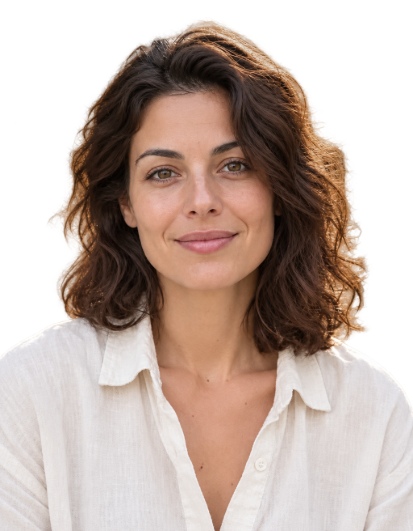
परिणाम
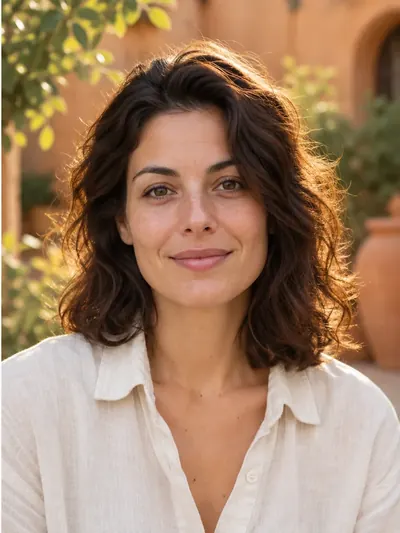
या परिणामासाठी वापरलेल्या सेटिंग्ज
- मॉडेल
- gpt-image-2.5-sunburst
- AI प्रतिमा निर्मिती गुणवत्ता
- मानक
कापणी, पांढरे भरणे, कपड्यांचे ओव्हरले आणि प्रिंट लेआउट तुमच्या ब्राउझरमध्ये चालतात. फक्त व्यक्तीचे कटआउटच सशुल्क OpenAI प्रक्रिया वापरते.
स्वयंचलित सूचना
Isolate only the main person in the reference photo. Keep their visible body, hair, clothing and worn accessories. Remove every other person and every non-person object, including chairs, armchairs, seats, backrests, headrests, armrests, furniture, cushions, equipment and objects held in the hands. A chair or other object must be removed even when the person is sitting on it, leaning against it, touching it, or when it closely follows the outline of their head, hair, shoulders or clothing. Do not include any part of a chair or other surrounding object in the person cutout. Make all areas outside the person and all visible gaps between their body parts fully transparent. Preserve the exact identity, facial features, expression, skin texture, hair, clothing, body pose and natural outlines. Do not beautify, retouch or regenerate the face, and do not invent hidden or cropped body parts. Keep the original framing and orientation. Return only the person on a fully transparent background, with clean natural edges and no shadows or solid background.या सेटिंग्ज प्रकाशित उदाहरणाचे वर्णन करतात. नवीन रनमधून वेगळी प्रतिमा तयार होऊ शकते.
पोर्ट्रेट लोड करा
Document photo उघडा आणि 40 MB आणि 36 MP पर्यंतची JPEG, PNG किंवा WebP निवडा, किंवा वेबकॅम फोटो घ्या. संपूर्ण डोके, मान आणि खांदे दिसतील याची खात्री करा.
स्वरूप आणि गुणवत्ता निवडा
दस्तऐवज आकार निवडा आणि चेहरा जुळवा. लॉग इन करा आणि मसुदा, मानक किंवा उच्च पार्श्वभूमी-काढणी गुणवत्ता निवडा. त्यानुसार निश्चित खर्च 5, 10 आणि 30 क्रेडिट्स आहेत.
व्यक्तीमागे पांढरी पार्श्वभूमी चालवा
विशेष कृती बटण दाबा. मुख्य व्यक्ती, कपडे आणि घातलेले अॅक्सेसरीज ठेवून पार्श्वभूमी, खुर्च्या आणि इतर वस्तू काढण्याच्या सूचनांसह कमी आकाराची प्रत OpenAI कडे पाठवली जाते. अतिथींचे मोफत प्रयत्न वापरले जात नाहीत.
तपासा आणि निर्यात करा
केस, चेहरा आणि खांदे तपासा. संपादक पारदर्शक भाग पांढऱ्याने भरतो; या त्याच फोटोसाठी आणखी सशुल्क काढणीची विनंती न करता तुम्ही राखाडी किंवा निळा निवडू शकता. तयार करा आणि JPG किंवा PNG डाउनलोड करा.
उपयुक्त टिपा
रंग यादीतील फक्त White निवडल्याने अपारदर्शक पार्श्वभूमी हटत नाही. प्रक्रिया केलेला स्रोत आणि कटआउट खाजगी इतिहासात 90 दिवसांपर्यंत ठेवला जातो; क्रॉपिंग आणि रंग बदल ब्राउझरमध्ये चालतात.